Ai Tools

Discover the best AI tools across every category — writing, image, video, coding, chatbots, SEO, marketing, productivity, design, and more. Reviews, comparisons, and guides to help you find the right AI tool for any task.

How to Use ChatGPT for Content Creation Writing
Ai Tools, AI Writing Tools

How to Use ChatGPT for Content Creation Writing

To use ChatGPT for content creation writing, give it specific context (Audience, Tone, structure, and Goal) rather than a vague topic, use it for ideation and first drafts rather than final copy, and always Edit for facts, voice, and original insight before publishing. ChatGPT works best as a drafting and brainstorming partner not a finished content machine. If you’ve typed “write a blog post about [topic]” into ChatGPT and gotten back something that reads like every other Article on the internet, you’re not doing Anything wrong you’re just missing a process. ChatGPT can genuinely speed up content creation, but only when you treat it like a writing partner that needs direction, not a vending machine that needs a coin. This guide walks through exactly how to use ChatGPT for content creation writing: the prompts that work, the ChatGPT features most people never touch, the mistakes that make AI writing obvious, and the honest limits of what it can and can’t do for you. Why ChatGPT Alone Isn’t Enough (and Why That’s Okay) Here’s the part most guides skip: ChatGPT doesn’t know your Brand, your Audience, or your industry unless you tell it every single time, in every single chat. It also can’t verify facts, and it will confidently state things that are wrong. None of that means it’s not worth using. It means you Need a process around it. Think of ChatGPT the way a good Editor thinks of a junior writer: capable of a strong first pass, but not ready to publish without a review. Used that way, it can cut your writing time significantly. Used as a replacement for editorial judgment, it produces exactly the generic, forgettable content you’ve probably already run into. Step 1: Set Up ChatGPT Before You Write Anything Most people skip this step and Wonder why every conversation starts from zero. ChatGPT has three features specifically built to fix that. Expert tip: Paste 2–3 examples of your best-performing content into a Project’s files before you start writing anything new. ChatGPT will reference the tone and structure automatically instead of defaulting to generic AI phrasing. Step 2: Use ChatGPT for Content Ideation Quick answer: For content ideas, give ChatGPT your audience, their specific pain points, and your content goal — then ask for tactical, not generic, topics. Vague prompts produce vague topic lists. Prompt Template — Content Ideation Once you have a list, don’t just pick the first one that sounds good. Run each title through a keyword tool (even a free one like Google’s autocomplete or “People Also Ask” boxes) to check whether people are actually searching for it. Common mistake: Asking for “blog ideas about [broad topic]” with no audience detail. You’ll get a list that could apply to any company in any industry which means it won’t rank or convert for yours. Step 3: Research With ChatGPT (Carefully) Quick answer: ChatGPT can compile research quickly, but it can also invent statistics and sources that sound real but aren’t. Always ask it to flag uncertain claims, and verify every number before it goes in your article. Here’s a research workflow that keeps you honest: Warning: Never publish a statistic, quote, or study citation from ChatGPT without independently confirming it exists. Fabricated sources are one of the fastest ways to damage your credibility and your SEO rankings if a reader or competitor calls it out. Step 4: Write the First Draft ChatGPT writes better first drafts when you give it a full brief audience, Tone, structure, word count, and what to avoid rather than a single sentence. Feed it section by section for long-form content rather than asking for everything at once. Prompt Template — First Draft Why section by section works better: ChatGPT tends to lose track of instructions in very long single responses. For anything over roughly 1,500 words, ask for one section at a time. You’ll get more consistent tone and fewer dropped instructions than asking for the whole piece in one shot. Step 5: Edit for Voice, Facts, and Original Value This is the step that separates content that ranks from content that gets ignored. A ChatGPT draft is a skeleton the muscle has to come from you. What to add during editing: Common AI writing tells to remove: AI Pattern Human Fix “In today’s fast-paced digital landscape…” Cut it — start with the actual point Overuse of “moreover,” “furthermore,” “additionally” Use simple transitions or none at all “It’s not just about X, it’s about Y” Say the actual thing directly Perfectly symmetrical lists (always exactly 3 or 5 points) Let some sections run 2 points, others 7 Overly balanced “on one hand / on the other hand” hedging Take an actual position Step 6: Optimize for SEO and AI Overviews Quick answer: Ask ChatGPT to help with keyword placement and meta descriptions, but don’t rely on it for search intent or ranking strategy pair it with a real SERP check of what’s currently ranking. Use ChatGPT for: Don’t rely on ChatGPT for: Step 7: Repurpose Content Efficiently Once an article is published, ChatGPT is genuinely useful for reshaping it into other formats as long as you tell it exactly what each platform needs. Prompt Template — Repurposing Expert tip: Repurpose the same article into 2–3 different post styles (a personal story angle, a listicle angle, a contrarian-take angle) rather than one straight summary. Different framings perform differently even from identical source material. Mistakes to Avoid When Using ChatGPT for Content Creation When ChatGPT Isn’t the Right Tool ChatGPT is strong for ideation, first drafts, and repurposing. It’s weaker for: ChatGPT vs. Other AI Writing Tools Tool Best For Limitation ChatGPT Ideation, drafting, repurposing, general writing Can lose context in long chats; no built-in brand memory across projects unless set up manually Claude Research-heavy writing, nuanced instructions, longer context retention Less widely integrated into marketing tools Gemini Writing tied to Google Workspace and Search Style consistency varies by prompt Jasper / purpose-built AI writing platforms Teams publishing high volumes

App That Pays You to Walk
AI Productivity Tools

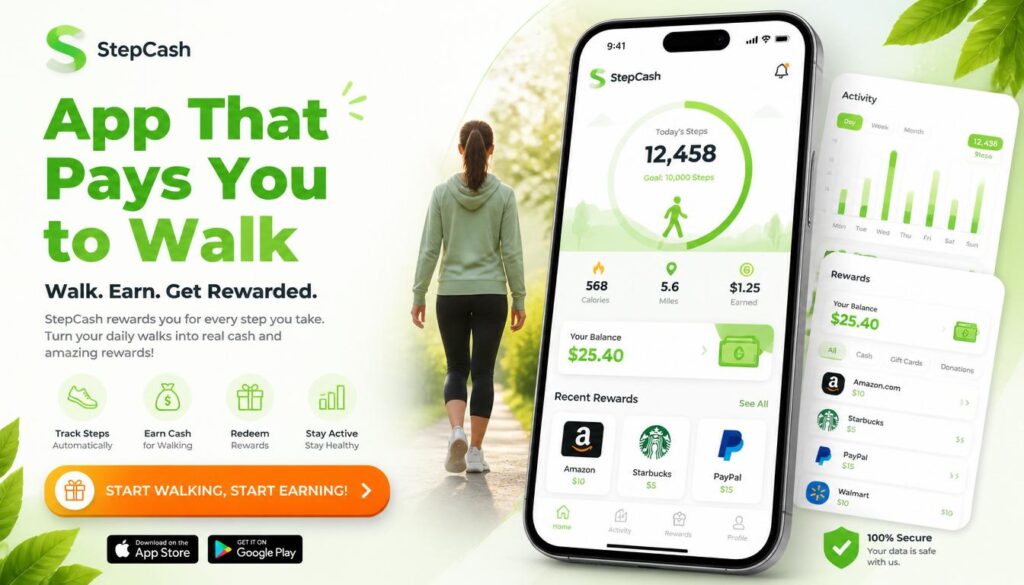
10 Best App That Pays You to Walk in 2026 (Earn Money While Walking)

You already walk to the Mailbox, the Store, and around the block with the Dog. What if that same walk quietly put a little cash in your pocket? Yes ! there really is an app that pays you to walk. Several, in fact. They use your phone’s built-in step counter to track your movement and reward you with cash, PayPal Transfers, Gift cards, or charity donations for hitting daily step goals. None of them will replace your paycheck, but they turn steps you’re already taking into small, real rewards. This guide breaks down the best apps that pay you to walk in 2026, exactly how much you can Realistically expect to earn, how the tracking works, and how to Avoid apps that waste your time or your data. The best all-around app that pays you to walk is Sweatcoin for name recognition and marketplace variety, StepBet for the highest cash upside if you don’t mind risking a small stake, and Evidation for the most reliable PayPal payouts. Realistic earnings across most walking apps run $5–$40 per month, not the $100/day claims you see on social media. Key Takeaways How Do Walking Apps That Pay You Actually Work? Walking apps use your smartphone’s built in sensors mainly the Accelerometer and Pedometer to detect and count your steps, then convert that activity into points, coins, or cash. Some apps also use GPS to confirm you’re actually moving outdoors rather than shaking your phone to fake steps. Here’s what’s happening under the hood: Sensor What It Does Accelerometer Detects movement and orientation to count steps Pedometer (hardware) Dedicated step-counting chip in newer phones, uses less battery Gyroscope Adds rotational data to improve step accuracy GPS Confirms outdoor movement and estimates distance/pace Barometer Measures elevation changes on phones that support it Bluetooth Syncs data from a connected fitness tracker or smartwatch Once your steps are verified, the app converts them into a reward using one of three business models: This is worth understanding before you sign up: if an app isn’t charging you a subscription, it’s very likely earning money from your data or your attention. That’s not necessarily a bad trade, but it’s one you should make with your eyes open. If data privacy matters to you, look for apps that are upfront about how they use your information, and avoid ones that ask for permissions unrelated to step tracking (like access to your contacts or camera). Best Apps That Pay You to Walk in 2026 Here’s how the top walking apps compare at a glance before we break each one down individually. 1. StepBet — Best for Highest Earning Potential StepBet flips the usual model instead of the app paying you directly, you place a small bet on yourself. Join a challenge, commit to a step goal over roughly six weeks, and if you hit your Targets, you split the prize pool with everyone else who also succeeded. How it works: Most games require a $10–$40 entry fee. StepBet takes a cut (historically around 15%) from the pot, and the rest is split among winners. There’s a real chance to come out ahead some users report turning a $40 stake into $50+ but you also risk losing your stake if you miss even one weekly goal. Pros: Cons: Best for: People who are already consistent walkers and want real stakes to stay motivated, and who are comfortable with a bit of financial risk. 2. Sweatcoin — Best for Brand Recognition and Rewards Variety Sweatcoin is the most recognized name in this space, with tens of millions of users. It converts your outdoor steps into “Sweatcoins,” a digital currency you can redeem in its marketplace for products, gift cards, and occasional cash-out offers through partner promotions. How it works: Roughly every 1,000 outdoor steps earns you about one Sweatcoin. GPS is required to confirm the steps happened outside, so treadmill walking generally won’t count. Outdoor verification also means Sweatcoin uses more battery than GPS-free alternatives. Pros: Cons: Best for: Casual walkers who want variety in what they redeem rewards for, rather than a straightforward cash payout. 3. Evidation Best for Reliable PayPal Cash Evidation (formerly Achievement) rewards more than just walking it also credits you for logging sleep, completing health surveys, and syncing data from other Fitness apps. It’s built Around health research partnerships, which is part of why its payouts tend to be more consistent than pure step counting apps. How it works: You earn up to about 40 points a day for completing health-related tasks, including walking. Once you reach 10,000 points, you can redeem them for PayPal cash, gift cards, bank deposits, or charity donations. Pros: Cons: Best for: People who already track sleep and fitness data and want to be rewarded for the full picture, not just steps. 4. WeWard — Best for Consistent Small Cash Rewards WeWard converts steps into points called “Wards,” which you can redeem for PayPal or Venmo cash, gift cards, or charitable donations. It’s built around daily and weekly challenges that boost your earning rate if you stay active. How it works: You earn roughly 25 Wards per day at baseline, climbing to around 88 Wards once you level up. The exact Ward-to-dollar conversion isn’t fully transparent, but most users report earning $1–$3 per month, with heavier stacking of challenges pushing that higher. Pros: Cons: Best for: Walkers who want a straightforward cash option and don’t mind checking in on the app daily. 5. WinWalk — Best for Privacy and Battery Life WinWalk stands out because it doesn’t use GPS at all, relying purely on your phone’s pedometer and accelerometer. That means it won’t track your location, and it’s noticeably lighter on your battery than GPS-based competitors. How it works: You earn one coin for every 100 steps, up to a cap of 100 coins per day (roughly 10,000 steps). Coins are redeemable for gift cards once you build up enough of a balance, typically around 20,000 coins per reward. Pros: Cons: Best

What Is SEO Content Writing
Ai Tools, AI SEO Tools, AI Writing Tools

How to Write SEO Content People Actually Want to Read (2026 Guide)

SEO content writing is the process of creating articles that satisfy both search engines and real readers. It combines keyword research, search intent matching, clear structure, and E-E-A-T signals so your content ranks on Google, gets cited in AI Overviews, and Actually helps the person who clicked on it. If you’ve ever published a blog post and heard nothing but crickets, this guide fixes that. You’ll learn the exact steps to research, write, and optimize content that ranks no fluff, no jargon. What Is SEO Content Writing, Really? SEO content writing means writing with two readers in mind at once: the human who typed a question into Google, and the algorithm deciding whether your Answer deserves a spot on page one. It’s not about stuffing a keyword into every paragraph. It’s about Answering a specific question better than anyone else has answered it, then structuring that answer so search engines and AI tools can find, understand, and trust it. Good SEO content writing does three things: Miss any one of these, and your content struggles no matter how well-written it is. SEO Content Writing vs. Regular Content Writing People often confuse the two. Here’s the difference in practice. Regular Content Writing SEO Content Writing Starting point An idea or opinion Keyword and search intent research Structure Flexible, narrative-driven Clear H2/H3 hierarchy built for scanning Goal Express an idea Rank, get cited, and convert Length Whatever the story needs Matched to what’s already ranking Success measure Engagement, shares Organic traffic, rankings, AI citations Regular content can still rank if it happens to match what people search for. SEO content writing removes the guesswork by starting with research instead of hoping for the best. Why SEO Content Writing Matters More in 2026 Search has split into two lanes: traditional Google results and AI-generated answers from tools like ChatGPT, Gemini, and Perplexity. Both lanes reward the same underlying habits clear structure, real expertise, and content that actually solves the problem. Three shifts make this more important than ever: AI Overviews now sit above organic results. If your content isn’t structured to be quoted directly, an AI summary can answer the question before anyone reaches your page. Google’s Helpful Content system penalizes thin, keyword-stuffed writing. Content built to please an algorithm instead of a person tends to lose visibility over time. Trust decides everything. Google’s own quality guidelines describe trustworthiness as the most important piece of E-E-A-T — content can be technically accurate and still rank poorly if it doesn’t read as credible. The upside: organic search still delivers some of the highest returns in marketing, because a well-optimized page can keep attracting visitors for years without ongoing ad spend. How to Write SEO Content That Ranks: A 9-Step Process Step 1: Research Keywords Your Audience Actually Types Start with a free tool like Google Keyword Planner, or a paid one like Semrush or Ahrefs. Type in your general topic and look for: Practical takeaway: pick one primary keyword per article. Trying to rank one page for five unrelated terms dilutes your focus and confuses search engines about what the page is actually about. Step 2: Match Search Intent Before You Write a Word Search intent falls into four buckets: Google your target keyword and look at what’s already ranking. If the top 10 results are all how to guides, write a how to guide. If they’re all comparison posts, a listicle won’t rank, no matter how good it is. Practical Takeaway: let the current search results dictate your content format, not your personal preference. Step 3: Build an Outline Before You Draft An outline forces you to plan coverage instead of writing in circles. A solid SEO outline includes: This is also where you decide on your “information gain” — the original insight, example, or data point that makes your article worth reading over the other nine already ranking. Step 4: Write for Readers First, Structure for Machines Second Draft your content using short paragraphs (two to three sentences), plain language, and a logical flow from problem to solution. Aim for a 7th–8th grade reading level Simple doesn’t mean simplistic, it means nobody has to re-read your sentence to understand it. Use your primary keyword naturally in: Everywhere else, favor synonyms and related phrases over repeating the exact keyword. Search engines understand context now; they don’t need the same three words hammered into every line. Step 5: Optimize Your On-Page Elements Three small elements decide whether people click your result at all. Element Best Practice Title tag Keyword near the front, under 60 characters Meta description 150–160 characters, active voice, includes a soft CTA URL slug Short, hyphenated, includes the keyword, no dates Practical takeaway: write five title options and pick the one that would make you click if you saw it in a stranger’s search results. Step 6: Build In E-E-A-T Signals E-E-A-T stands for Experience, Expertise, Authoritativeness, and Trustworthiness Google’s framework for judging whether content deserves to rank, especially on topics that affect people’s money, health, or safety. Add real weight to your content by: Practical takeaway: if you can’t back up a claim with a source or firsthand experience, cut it or soften it. Vague authority reads as no authority. Step 7: Optimize for AI Overviews and Featured Snippets This is the step most guides skip, and it’s increasingly the difference between getting traffic and getting summarized without a click. Practical takeaway: after you draft a section, ask yourself if an AI tool could lift that paragraph word-for-word as a correct, standalone answer. If not, tighten it. Step 8: Add Internal and External Links Internal links help search engines understand how your content connects to the rest of your site, and they keep readers exploring instead of leaving. External links to credible sources back up your claims and signal that you did real research. Aim for two to five relevant internal links per 1,000 words, and only link where it genuinely helps the reader — forced links hurt more

Best keyword research tools compared in 2026
Ai Tools, AI SEO Tools

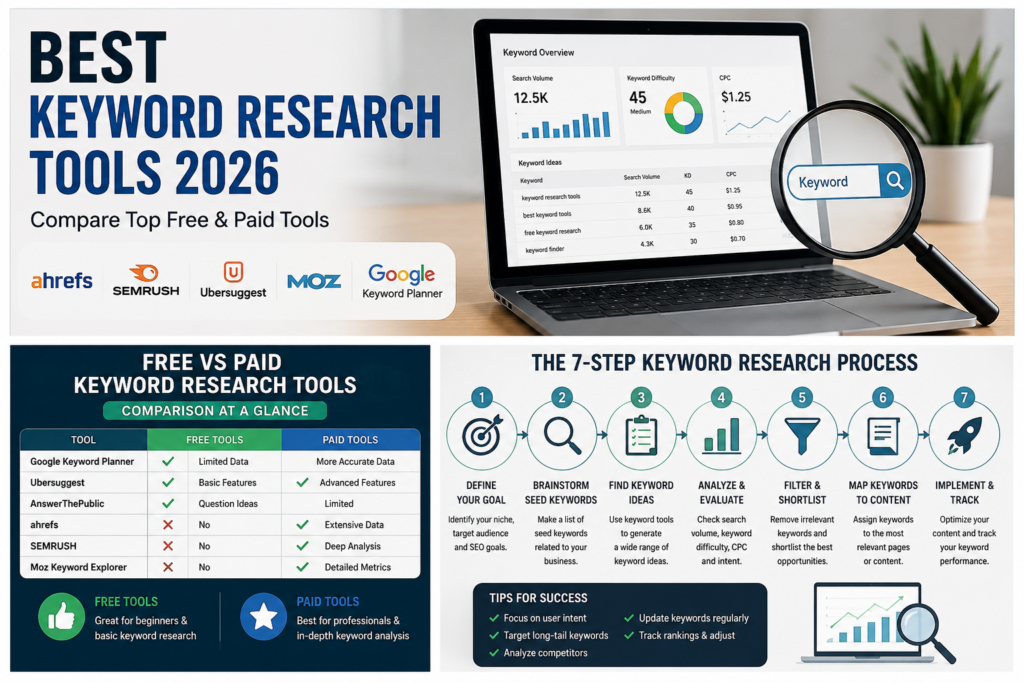
Best Keyword Research Tools in 2026 (Free & Paid, Compared)

Picking the wrong keyword research tool wastes Months. You end up chasing search volumes that don’t exist, writing about topics your competitors already own, or missing the exact questions your customers are typing into Google and ChatGPT. This guide compares the keyword research tools that are actually worth your time in 2026, including which ones are free, which are worth paying for, and how to pick the right one for your situation. What Is a Keyword Research Tool? A keyword research tool is software that shows you the words and phrases people type into search engines, along with data like Monthly search volume, competition level, and search intent. It helps you decide what to write about and which terms are realistic to rank for. Most keyword research tools pull data from one of three places: Google’s own advertising system (like Google Keyword Planner), clickstream data from real user behavior (like Similarweb), or a mix of both plus their own crawled search results (like Semrush and Ahrefs). None of these sources is perfect. Google’s numbers are ranges, not exact figures, unless you’re actively running ads. Clickstream data is an estimate based on a sample of users. Crawled data can lag behind sudden spikes in interest. That’s why experienced SEOs rarely trust one number from one tool. They use a keyword research tool to generate ideas and rough volume estimates, then confirm real performance later using Google Search Console, which shows what’s actually happening on their own site. What to Look for in a Keyword Research Tool Quick answer: The best keyword research tools combine four things: a large keyword database, Accurate search volume, clear search intent labeling, and a way to see what your competitors already rank for. Anything missing one of these will leave gaps in your strategy. Before you commit to a tool, check it against this list: The Best Keyword Research Tools, Compared Here’s a side-by-side view of the tools worth your attention this year. Tool Best For Free Option Starting Paid Price Standout Feature Google Keyword Planner Free, direct-from-Google data Yes (needs Google Ads account) Free Real Google search data, no third-party estimation Google Search Console Existing sites, real performance data Yes Free Shows keywords you already rank for, with real clicks Semrush All-round SEO, agencies Limited (10 searches/day) ~$139.95/mo Massive database with AI intent classification Ahrefs Competitor keyword gap analysis Limited free tool Paid plans vary Traffic potential metric, huge crawled index Similarweb Real clickstream-based volume Limited free generator Paid plans vary Non-clustered, real-user monthly search volume Moz Keyword Explorer Accurate difficulty scoring 3 searches/day ~$99/mo Difficulty score based on real ranking-page authority Ubersuggest Beginners, small budgets 3 searches/day ~$29/mo Simple interface, content idea suggestions KWFinder (Mangools) Long-tail keywords on a budget Limited Budget-friendly Clean UI built for beginners AlsoAsked People Also Ask & AI Overview research Limited free searches Paid tiers Visual map of real PAA question chains Note on accuracy: No two tools will show you the exact same search volume for the same keyword — that’s normal. What matters more is consistency: pick one or two tools and use them to compare keywords against each other, not to chase an exact number. Free Keyword Research Tools Worth Using Quick answer: If your budget is zero, combine Google Keyword Planner for volume ranges, Google Search Console for real performance data on your own site, and AlsoAsked or Google Autocomplete for question-based long-tail ideas. Together they cover most of what a paid tool does. Expert tip: Run the same seed keyword through two or three free tools before you commit to a content topic. If a keyword shows decent volume in Keyword Planner but zero related questions in AlsoAsked, the topic may be too narrow to build a full article around. Paid Keyword Research Tools Worth Paying For Quick answer: Upgrade to a paid tool once you’re publishing regularly and need competitor keyword gaps, clustering, and rank tracking in one place. Semrush and Ahrefs cover the most ground; Similarweb and Moz are strong on specific strengths (real clickstream volume and difficulty accuracy). Common mistake: Buying the most expensive tool before you have a content calendar to use it on. A $139/month tool sitting mostly idle is a worse investment than a $29/month tool you actually open every week. How to Do Keyword Research, Step by Step Quick answer: Start with a broad seed keyword, expand it into a full list using a keyword tool, filter by search intent and realistic difficulty, then check what’s already ranking before you commit to writing. Keyword Research for AI Search Quick answer: Keyword research now has to account for how people search inside AI tools like Google AI Overviews, ChatGPT, and Perplexity — not just the traditional blue-link results. These platforms favor content that answers a question directly and clearly, often within the first few sentences of a section. This is the part most keyword guides still skip. A few practical adjustments: Common Keyword Research Mistakes to Avoid How to Choose the Right Tool for You If you are… Start with A brand-new blogger with no budget Google Keyword Planner + Google Autocomplete + AlsoAsked A small business with some budget Ubersuggest or KWFinder A growing content team Semrush or Ahrefs An agency managing multiple clients Semrush or Ahrefs (workflow and reporting depth) Focused on real, unmodeled search volume Similarweb Focused on keyword difficulty accuracy Moz Keyword Explorer FAQs What is the best keyword research tool overall? There’s no single “best” tool for everyone — Semrush and Ahrefs lead for all-round depth, Similarweb leads for real clickstream-based volume, and Google Keyword Planner remains the best free, direct-from-Google option. Are free keyword research tools accurate enough to use? Free tools like Google Keyword Planner and Search Console are accurate for their intended purpose, but Keyword Planner shows volume ranges rather than exact figures unless you’re running active ad spend. Do I need a paid keyword research tool to rank on Google? No. Many sites rank well using only free

Why Is My Website Not Ranking on Google
Ai Tools, AI SEO Tools

Why Is My Website Not Ranking on Google? 17 Proven Fixes (2026)

So you built a website, published content you were genuinely proud of, and waited for the traffic to roll in. Instead… crickets. If that’s you, take a breath. This happens to almost Everyone, even people who did most things right. Here’s the short answer first: your Website Not Ranking on Google because of one (or more) of these issues poor indexing, weak content, Technical SEO problems, low-quality backlinks, slow page speed, a rough user experience, or simply targeting the wrong keywords. The fix starts with checking Google Search Console, cleaning up Technical errors, sharpening your content, and steadily building authority around your topic. Let’s walk through exactly what’s likely going wrong, and how to fix it. First, How Does Google Actually Decide Who Ranks? Before you troubleshoot Anything, it helps to know the basic path a page takes to reach Google’s search results. Google crawls your site to find your pages. Then it indexes the pages it thinks are worth storing. After that, it ranks your page Against everyone else competing for the same search. And even after all that, it keeps adjusting your ranking over time based on how people behave when they land on your page. If your site stumbles at any one of these steps, nothing downstream matters. A page that isn’t crawled can’t be indexed. A page that isn’t indexed can’t rank. So before you touch your keywords or your content, make sure Google can actually find and store your pages in the first place. 1. Your Pages Might Not Be Indexed Yet This is the single most common reason a site doesn’t rank — Google simply hasn’t added the page to its index yet. And an unindexed page has zero chance of showing up in search results, no matter how good it is. Want to check? Search site:yourdomain.com on Google. If your key pages don’t show up, that’s a red flag. You can also open Google Search Console and look at the Pages report, which tells you exactly which pages are indexed, excluded, or stuck with crawl errors. What usually causes this? A stray noindex tag you forgot about. A robots.txt file Accidentally blocking the page. A soft 404. Duplicate URLs. A canonical tag pointing somewhere else. Content that’s too thin to be worth indexing. Or the page might just be brand new and Google hasn’t gotten to it yet. The fix is refreshingly simple: remove any accidental noindex tags, double-check your robots.txt file, submit your XML sitemap, and request indexing directly through Search Console. If the page is thin, beef it up before asking Google to look again. Indexing is the floor everything else sits on get this right first. 2. You Might Be Chasing the Wrong Keywords It’s tempting to go after keywords with huge search volume. But those keywords are usually locked up by websites that have been building authority for years. A brand-new site trying to rank for something broad like “SEO” is fighting an uphill battle it probably won’t win Anytime soon. You might be Aiming at the wrong keywords if the competition looks intimidating, the search intent feels vague, big brands own the entire first page, or your click-through rate is low even though people are seeing your listing. A smarter approach: go after long-tail keywords, lower-competition phrases, and question-based searches —the specific stuff people actually type when they’re trying to solve a real problem. Instead of one article trying to cover everything, build a small cluster of related posts around one topic. For example, Alongside an article on “website not ranking on Google,” you could add pieces on how Google indexes sites, a Search Console beginner’s guide, a Technical SEO checklist, and an explainer on robots.txt. Together, they tell Google you actually know this subject not just one corner of it. 3. Your Content Might Not Match What People Actually Want Google’s whole job is matching searchers with the best possible answer. If your page doesn’t actually solve the problem someone typed in, it’s not going to rank well, even if it’s technically flawless. Most searches fall into one of four buckets: people looking to learn something, people trying to find a specific site, people comparing options before buying, or people ready to take action right now. Someone searching “website not ranking on Google” wants troubleshooting help not a sales pitch. Common traps include vague intros that dance around the actual problem, theory without practical steps, ignoring beginner-level questions, and skipping screenshots or examples that would make things clearer. To fix this, Answer the core question early within the first hundred words if you can break the topic into clear steps, use real examples, and keep updating the piece as things change. A useful gut check before hitting publish: does this fully solve the reader’s problem? If not, it’s not done yet. 4. Technical SEO Issues Might Be Quietly Sabotaging You You can write brilliant content and still get buried if your site has technical problems under the hood. Think of technical SEO as your site’s foundation if it’s shaky, nothing built on top of it stands very tall. Watch out for broken internal links, 404 pages, redirect loops, a missing sitemap, wrong canonical tags, duplicate URLs, weak mobile usability, and HTTPS issues. A few free tools make this easy to check: Google Search Console for crawl and indexing errors, PageSpeed Insights for performance, the Rich Results Test for structured data, and Lighthouse for an overall health check. Fixing this is mostly cleanup work: repair broken links and redirects, keep your sitemap current, use canonical tags correctly, make sure important pages return a clean 200 status, and confirm your site works well on mobile. A technically healthy site is just easier for Google to crawl and that alone gives your pages a real edge. 5. Your Site Might Be Loading Too Slowly Speed matters twice over once for rankings, and once because slow pages just lose people. If your site takes too long to load, visitors leave

How to learn to use AI
AI Productivity Tools, Ai Tools

How to learn to use AI: A complete beginner’s guide for 2026

The fastest way How to learn to use AI is to pick one general-purpose tool (like ChatGPT, Claude, or Gemini), spend 15–20 minutes a day using it for a real task you already do, and learn prompting through practice rather than theory. Most people who follow this approach report feeling comfortable within two to four weeks, according to informal surveys from online learning platforms like Coursera and LinkedIn Learning. You don’t need a technical background, a certification, or expensive software to get started. This guide walks through exactly how to learn how to use AI, step by step, using free and low-cost resources available to anyone in the United States right now. What does it Actually mean to learn to use AI “Learning to use AI” doesn’t mean learning to code or build machine learning models. For almost everyone, it means learning to use AI tools chatbots, writing assistants, image generators, and productivity apps — to get better results in less time. There are three practical skill levels worth knowing: Most beginners only need the first two levels to see real time savings. A 2024 McKinsey survey found that employees using generative AI tools saved an average of about four hours per week on routine tasks — a useful benchmark for what “learning to use AI” is actually worth to you. Takeaway: Set your goal at “applied use” first. Trying to jump straight to advanced workflows before you’re comfortable with the basics is the number one reason people give up. How to learn to use AI step by step This is the core process. If you only read one section, read this one. Step 1: Pick one AI tool and commit to it Don’t try to learn five tools at once. Choose one general-purpose assistant and use it exclusively for the first two weeks. In the US market, the three most common starting points are: Pick whichever one you already have easiest access to. The tool matters far less than the consistency of use. Step 2: Learn prompting basics — not prompt engineering courses You don’t need a $200 prompt engineering course. You need to learn four habits: Example in practice: A small business owner in Ohio wanted better product descriptions for her Etsy shop. Her first prompt, “write a product description for a candle,” produced generic copy. After adding context — her brand tone, target customer, and a real example of a description she liked — the AI’s third attempt was good enough to publish with minor edits. That’s the whole skill: iterate, don’t restart. Step 3: Practice on tasks you already do Skip tutorials that teach AI in the abstract. Instead, bring your real weekly tasks to the tool: A Pew Research Center report from 2025 found that roughly 34% of US adults had used an AI chatbot, but only about half of those used it for anything beyond casual questions — the gap between “tried it” and “learned it” comes almost entirely from this practice step. Step 4: Build a five-day-a-week habit for one month Skill retention with AI tools follows the same pattern as any new software: frequency beats duration. Ten focused minutes a day for 20 days will teach you more than one three-hour weekend session. Takeaway: Block 15 minutes on your calendar, same time each day, for the next 20 workdays, and use that time only for real tasks — not experimentation. How to learn to use AI for free You can learn everything covered so far without spending a dollar. Free resources worth using, specifically for US-based learners: Paid courses (typically $30–$150 on platforms like Udemy or Coursera) can be worth it if you want structure and accountability, but they are not necessary to reach basic competence. Takeaway: Spend zero dollars for your first 30 days. Only pay for a course if you hit a specific wall a free resource can’t solve. How to use AI to learn faster (using AI to learn AI) One underused trick: use the AI tool itself as your tutor for learning the AI tool. This is faster than searching for separate tutorials. Try prompts like: This approach works because the tool can tailor explanations to your actual skill level in real time, something static tutorials can’t do. A 2023 Stanford study on AI tutoring found students using conversational AI for self-paced learning progressed roughly 2x faster on comprehension checks compared to reading static material alone — a strong argument for learning AI this way specifically. Takeaway: Before searching YouTube for “how to prompt ChatGPT,” just ask the chatbot to teach you directly. Common mistakes people make when learning to use AI Avoiding these will cut your learning curve significantly: Takeaway: Pick one mistake from this list that sounds like you, and fix just that one this week. How long does it take to learn to use AI Based on typical beginner timelines reported across online learning platforms and workplace training programs: Skill level Typical time to reach it Comfortable asking basic questions 1–3 days Confident using AI for regular work tasks 2–4 weeks Combining AI with other tools/workflows 2–3 months These ranges assume the 15-minutes-a-day habit from Step 4 above. People who use AI tools sporadically — once every week or two — often take three to four times longer to reach the same comfort level, since prompting skills fade without regular use. Takeaway: Judge your progress in weeks, not days, and don’t compare your week-one results to someone else’s month-three results. How to use AI to learn a language, code, or any new skill Once you know how to learn to use AI for everyday tasks, the same habits transfer directly to learning a new skill. People increasingly use AI to learn a new language, learn to code, or pick up a subject like math or writing, and the method barely changes. Here’s the pattern that works across skills: A 2024 Duolingo report noted that learners using AI-powered conversation practice completed roughly 20% more practice

HOW TO Write Engaging Content
Ai Tools, AI Writing Tools

How to Write Engaging Content (That People Actually Finish Reading)

The Average reader decides whether to keep reading or leave within the first two sentences. That’s it how to write engaging content Two sentences to earn someone’s time and attention. If you’ve ever published a blog post, an email, or a social caption that felt “fine” but didn’t get read, shared, or remembered, you’re not alone. Most Advice about writing Engaging content is vague “be conversational,” “add personality,” “hook your reader.” None of that tells you what to actually do. This post fixes that. Below are 9 concrete Techniques, a Table you can use as a Quick reference, the most common mistakes that quietly kill Engagement, and a simple test to check your own writing before you hit publish. In short: to write Engaging content, use active voice, speak directly to the reader with “you,” open with a specific detail or moment of tension instead of a general statement, and break your paragraphs into short, scannable chunks. Engaging writing creates “forward pull” a reason for the reader to keep going, sentence after sentence. What Makes Writing Engaging, Really? Engagement isn’t about being clever or funny. It’s about giving the reader a reason to take the next step to read the next sentence, then the next paragraph, then the whole piece. Boring writing tells the Reader everything up front and gives them no reason to Continue. Engaging writing creates small, Constant pulls forward: a Question left unanswered, a detail that needs explaining, a story that hasn’t finished yet. Every sentence should either answer a question the reader just had, or raise a new one. That’s the whole game. Once you understand this, the specific techniques below start to make a lot more sense — they’re not random tricks, they’re all different ways of creating that forward pull. 9 Techniques to Make Your Content More Engaging 1. Use Active Voice, Not Passive Active voice puts the person doing the Action first. It’s shorter, clearer, and more direct which means less work for your reader’s brain. The active version is more honest, more human, and easier to read out loud. That’s usually a good sign it’s also easier to read silently. 2. Speak Directly to the Reader Using “you” turns a general statement into a personal one. It makes the reader feel like the content is written for them specifically, not for some Abstract audience. 3. Open With a Specific Detail, Not a General Statement Vague openings (“In today’s fast-paced world…”) give the reader nothing to hold onto. A specific detail — a number, a moment, a small scene — gives them something concrete right away. 4. Create Tension or an Unanswered Question Tension is what makes someone keep reading. If you answer every question the moment you raise it, there’s no reason to continue. Hold back just enough to keep the reader curious. For example, instead of immediately explaining why a technique works, mention that it works first — then explain why a paragraph or two later. 5. Use Real Numbers and Specifics “A lot of readers leave early” is forgettable. “60% of readers leave within the first 15 seconds” is not. Specific numbers, even estimates, make your writing feel more credible and easier to remember. 6. Break Paragraphs Into Short, Scannable Chunks Online readers skim before they commit to reading. A wall of text signals effort, and most readers don’t want to invest effort before they know if it’s worth it. Keep paragraphs to 2–4 sentences. Use white space generously. If a paragraph looks intimidating on the screen, it probably needs to be split. 7. End Paragraphs With a Reason to Keep Reading The last sentence of a paragraph does more work than people realize. It’s either a natural stopping point (bad) or a nudge toward the next paragraph (good). 8. Tell a Story Instead of Explaining a Concept People remember stories far better than they remember abstract explanations. If you can illustrate a point with a specific example, a mini-story, or a real scenario, do that instead of stating the concept directly. Compare “Short sentences improve readability” with “I cut a 40-word sentence down to 12 words, and my time-on-page doubled.” The second one sticks. 9. Cut Filler Qualifiers Words like “often,” “sometimes,” “in many cases,” and “it could be argued that” soften your writing and slow the reader down. Say the thing directly. You can always add nuance in the next sentence if you need to. Comparison Table: Techniques at a Glance Use this as a quick reference while you edit your next draft. Technique What It Does Quick Example Active voice Makes writing direct and clear “We fixed it” vs. “It was fixed” Direct address (“you”) Makes the reader feel personally spoken to “You’ll notice…” vs. “Readers will notice…” Specific opening Gives the reader something concrete right away A moment or number vs. a vague claim Tension/unanswered question Creates a reason to keep reading Mention a result before explaining why Real numbers Builds credibility and memorability “60% of readers” vs. “most readers” Short paragraphs Reduces the effort needed to keep reading 2–4 sentences per paragraph Strong paragraph endings Pulls the reader into the next section End on a question or a preview Storytelling Makes abstract points memorable A real example instead of a claim Cutting filler qualifiers Makes statements land with more confidence Remove “often,” “sometimes,” “can” 5 Mistakes That Kill Reader Engagement How to Test If Your Writing Is Engaging Before you publish, run this quick check: This isn’t a perfect science, but it catches most of the problems that make writing feel flat. FAQ What makes writing engaging? Engaging writing gives the reader a reason to keep going — through specific details, active voice, direct address, and small moments of tension that pull them into the next sentence. How do I make my blog content less boring? Start with a specific detail instead of a general statement, use active voice, and keep paragraphs short. Cutting filler qualifiers also makes writing feel more direct and confident.

best apps for student
Ai Tools, AI Productivity Tools

15 Best Apps for Students to Stay Organized in 2026

The best Apps for students in 2026 help with four Things organizing Assignments, Taking better class notes, staying focused during study sessions, and Managing deadlines without burning out. Notion and Todoist lead the productivity category, OneNote and Evernote dominate note taking, Forest and Pomofocus help with focus, and tools like Grammarly and Quizlet AI speed up writing and revision. The trick isn’t downloading all of them it’s picking one tool per problem and sticking with it long enough to build a routine. Why Students Need a Real System, Not Just More Apps Being a student in 2026 means juggling more digital noise than any previous generation. Between online coursework, group chats, shared documents, part-time jobs, and exam prep, it’s easy to feel like you’re always one notification behind. Educators have pointed out that students who consistently use structured productivity tools tend to report better time management and noticeably lower academic stress compared to those who rely on memory alone. The problem most students run into isn’t a lack of tools. It’s the opposite. One app for notes, another for deadlines, a third for focus, a fourth somebody recommended on TikTok and within a month, keeping track of the apps becomes its own chore. Instead of saving time, the system eats it. A smaller, well-chosen set of tools solves this. You don’t need fifteen apps open at once. You need one for scheduling, one for notes, and one for focus used consistently. This guide walks through the strongest options in each category for 2026, with practical notes on who each tool actually fits. At a Glance: Top Apps Compared App Best For Free Plan AI Features Multi-Device Notion All-in-one organization Yes Yes Yes Todoist Task management Yes Limited Yes Google Calendar Scheduling Yes No Yes Grammarly Writing help Yes Yes Yes Forest Staying focused Yes No Mobile Quizlet Flashcards & revision Yes Yes Yes OneNote Class notes Yes No Yes Otter AI Lecture transcription Yes Yes Yes Use this as a starting point before testing anything in depth it’ll save you from downloading five apps that all do roughly the same job. Best Productivity Apps for Students Productivity apps work because they take the mental load off your brain. Instead of holding every deadline, every reading assignment, and every study session in your head, you offload it to a system that reminds you automatically. That matters most during exam season, when the number of moving pieces multiplies fast. Todoist Todoist is built for students who keep forgetting small but important deadlines a quiz on Thursday, a reading due Monday, a project check-in buried three weeks out. The interface stays uncluttered even once you’re tracking five or six classes at once. One feature worth highlighting is recurring tasks. You can set up a weekly reminder for a problem set or lab report once, and it regenerates automatically every week without re-entering it. What makes it useful day to day: The biggest advantage in practice is setup speed. Most students can get a working system running in well under ten minutes, which matters if you’re the type who abandons an app the moment it feels complicated. Notion Notion has become a default recommendation for students because it merges note-taking, planning, and database-style organization into a single workspace. A student juggling five courses can build assignment trackers, semester-long note pages, exam prep boards, and shared project dashboards all inside one tool. That flexibility is also its biggest risk. Because Notion can do almost anything, it’s easy to spend hours building an elaborate system instead of actually studying. The fix is starting with a simple template a basic weekly planner or class tracker rather than trying to design the “perfect” setup on day one. Notion vs. Todoist Feature Notion Todoist Best for Full organization Fast task tracking Learning curve Medium Easy Notes Excellent Limited Scheduling Good Excellent Collaboration Strong Strong If you like customizing and building your own system, Notion fits better. If you just want deadlines tracked with minimal setup, Todoist is the quicker win. Trello Trello swaps lists for visual boards, which feels less stressful than a traditional to-do list for a lot of students. Each assignment becomes a card that moves across columns typically something like To Do, In Progress, and Done. This setup works especially well for visual learners and for anyone managing a long-term project with multiple stages. A student prepping for finals, for instance, might give each subject its own column and watch tasks shift toward “Done” as the week progresses which turns out to be a surprisingly effective motivator during a stressful stretch. Once tasks are under control, the next common bottleneck is notes. Good scheduling only goes so far if your class notes are scattered across five different places. Best Note Taking Apps for Class Notes Disorganized notes cost students hours every month, usually right before an exam when it matters most. The most common mistake is spreading notes across random documents, screenshots, and message threads a system that works fine in week one and completely breaks down by week ten. OneNote OneNote functions like a digital notebook built specifically with classes in mind. Students can split notebooks by subject and section, then mix typed notes, scanned PDFs, images, and even audio in the same page. The standout feature is consolidation: a single page for one lecture can hold typed notes, a recording, a screenshot of a slide, and the related homework file. That alone removes a lot of the chaos that usually surfaces during exam week. Evernote Evernote leans heavily into search and organization. For research-heavy classes, that’s a real advantage being able to search “cell respiration” and instantly pull up every related note from the whole semester saves serious time during revision. It also syncs reliably across devices, which matters if you’re moving between a laptop in lecture, a tablet at the library, and a phone on the bus. GoodNotes GoodNotes is especially popular with iPad users who prefer handwriting to typing. Research on

HOW TO MONITIZE A PODCAST
Ai Tools

How to Monetize a Podcast With Sponsors in 2026

Podcasting is no longer just a hobby for creators recording in a spare bedroom. According to Statista, the Global podcast industry is Expected to pass Billions in Advertising revenue over the next few years as brands shift more budget into audio advertising and creator partnerships. Most podcasters struggle with the same frustrating question: “How do people Actually make money from this?” They publish Episodes consistently, grow listeners slowly, and still feel invisible to Advertisers. Many creators Assume sponsors only work with huge shows getting hundreds of thousands of downloads every Month. That simply is not true anymore. Small niche podcasts are landing brand deals because Advertisers care About audience trust and listener Engagement more than raw download numbers. A focused audience of loyal listeners often converts better than a massive general audience that barely pays attention. This guide will show you exactly how to monetize a podcast with sponsors step by step. You’ll learn how sponsorships work, how much podcasts really earn, how to pitch brands professionally, and which platforms can help you find advertisers faster in 2026. What Is Podcast Sponsorship Monetization? Podcast sponsorship Monetization means earning money by promoting a company, product, or service during your podcast episodes. Sponsors pay podcasters to place ads in front of listeners because podcast audiences are highly engaged and trust host recommendations. Unlike display ads on websites, podcast sponsorships feel more personal. Listeners hear the recommendation directly from the host, which creates stronger conversion rates for brands. A 2024 Edison Research report found that podcast listeners are significantly more likely to remember audio ads compared to social media ads. That trust factor is one reason podcast advertising keeps growing every year. How Podcast Ads Work Podcast Ads are usually inserted in three main places: Mid-roll ads typically earn the highest CPM rates because listeners are already engaged with the content. Host-read Ads perform especially well because they sound natural. Instead of feeling like a commercial break, the ad feels like a recommendation from someone the audience already trusts. For example, a business podcast discussing productivity tools might naturally promote project management software during the middle of an episode. That feels relevant instead of forced. Types of Podcast Sponsorships There are several sponsorship models podcasters use to generate revenue. CPM Sponsorships CPM stands for “cost per Thousand Downloads.” Sponsors pay based on how many listeners hear the episode. Typical podcast CPM rates in 2026: Ad Placement Average CPM Pre-roll $18–$25 Mid-roll $25–$50 Post-roll $10–$20 Affiliate Sponsorships Affiliate sponsorships pay commission instead of a flat fee. You earn money when listeners use your custom referral link or promo code.This works well for beginner podcasters with smaller audiences. Sponsored Episodes Some brands pay creators to dedicate an entire episode to a topic, product, or industry trend connected to their business.These deals often pay significantly more than short ad placements. Why Brands Pay Podcasters Brands sponsor podcasts because Audio audiences are loyal and focused. People often listen while driving, working out, or commuting, which means fewer distractions compared to scrolling social media. From my experience, advertisers care most about three things: A podcast with 2,000 loyal listeners in the finance niche may outperform a general entertainment show with 20,000 casual listeners.That’s why niche podcasts can become profitable much faster than creators expect. The next step is understanding how many downloads you actually need before sponsors take your podcast seriously. How Many Downloads Do You Need for Sponsors? One of the biggest myths in podcasting is that sponsors only work with large creators. Many podcasters delay monetization for years because they believe they need massive audience numbers first. In reality, small podcasts can absolutely earn sponsorship revenue. Some advertisers work with creators getting fewer than 1,000 downloads per episode if the audience is highly targeted. Small Podcast Sponsorship Opportunities Smaller podcasts usually perform best with: For example, a local real estate podcast could partner with mortgage brokers, home inspectors, or interior design companies long before reaching mainstream popularity. This approach creates more realistic sponsorship opportunities early on. Niche Podcasts vs Large Podcasts Large podcasts attract bigger advertisers, but niche podcasts often deliver stronger conversion rates. Here’s why: Podcast Type Strength Large General Podcast Bigger reach Niche Podcast Higher trust and targeting A fitness supplement company would rather advertise on a dedicated fitness podcast than a random comedy show with unrelated listeners. That niche alignment matters more than vanity metrics. Average CPM Rates in 2026 Podcast CPM rates vary depending on industry, audience demographics, and engagement levels. Finance, business, marketing, and technology podcasts usually command the highest rates because advertisers can generate larger customer value from those audiences. Estimated Average CPM ranges in 2026: Podcast Niche Average Mid-Roll CPM Business $35–$55 Finance $40–$65 Technology $30–$50 True Crime $25–$40 Comedy $20–$35 A podcast earning 10,000 downloads per episode could realistically generate several hundred dollars from a single sponsorship placement. Now let’s look at how to package your show professionally before approaching sponsors. How to Create a Podcast Sponsorship Media Kit A podcast media kit acts like your sales presentation. It helps advertisers understand who your audience is and why your podcast is valuable.Many podcasters skip this step and wonder why brands ignore their outreach emails. A strong media kit instantly makes your show look more professional. Audience Demographics Sponsors want detailed listener information, including: Podcast analytics tools like Spotify for Podcasters and Apple Podcasts Connect provide demographic insights you can include. Specific audience data helps advertisers measure fit quickly. Download Statistics Your media kit should clearly display: Even modest numbers can look impressive if engagement is strong. For example, a podcast with 3,000 loyal weekly listeners and a 45% email open rate may appear far more attractive than a show with inflated but inactive downloads. Sponsorship Packages Create simple sponsorship packages advertisers can understand immediately. Example: Package Includes Price Starter 1 pre-roll ad $150 Growth Pre + mid-roll ads $350 Premium Sponsored episode + newsletter $800 Bundling multiple promotional assets increases perceived value and helps raise podcast ad

Droven IO AI Automation Tools
Ai Tools, AI Productivity Tools

Droven IO AI Automation Tools Review for 2026

Droven IO AI Automation tools refer to an Educational platform that helps Businesses Research, compare, and plan AI workflow Automation before committing to a tool. It covers platforms like Zapier, Make, and n8n Explaining how AI Automation works, which use cases fit best, and how to pick the right tool for your business needs. Most people searching this keyword expect to land on a dashboard. Instead, they find four nearly identical Articles saying the same vague things about “intelligent workflows” and “business Efficiency.” That Frustration is real and it happens because no one has bothered to explain what Droven.io Actually is and how it connects to the tools your business Needs right now. If you’ve been trying to figure out whether Droven IO is software you can use, a comparison site, or just a Content blog you’re asking exactly the right Question. The answer matters before you spend a single hour reading about it. This guide covers everything clearly: what Droven.io actually is, which AI automation tools it covers, how those tools compare side by side, real use cases with measurable outcomes, and who should (and shouldn’t) bother with it. No filler. No repetition. What Are Droven IO AI Automation Tools? Before Anything else, let’s clear up the confusion that every competing Article avoids. Droven.io is not a standalone Automation software platform. You cannot log in, build a workflow, and press run on Droven.io the way you would on Zapier or Make. It functions primarily as an informational and Educational resource a place where businesses learn about AI Automation tools, compare options, and plan their approach before buying or building anything. Think of it like this: Droven.io is the Guide at the front of the store, not the product on the shelf. It explains what AI automation does, which tools handle which tasks, and how different platforms fit different business sizes. That distinction changes how you use it. Quick Answer Callout Question Answer Is Droven.io real automation software? No — it’s an informational/educational platform Can you run workflows on Droven.io directly? No — you use tools it covers (Zapier, Make, n8n, etc.) Is it free to access? Yes — all content is free Who is it best for? Teams researching AI automation before buying The value of Droven IO AI automation tools content is real but only if you understand what it is. Businesses that treat it as a planning resource rather than a software product get far more out of it. Is Droven.io a Real Automation Platform or an Information Resource? This is the question no competitor Answers honestly. Here’s the breakdown. Droven.io sits in the same category as sites like G2, Capterra, or HubSpot’s blog it explains, reviews, and compares AI automation tools rather than building or hosting them. The platform produces guides on workflow Automation, no-code Tools, AI decision-Making systems, and Digital Transformation. Businesses use this content to understand the landscape before they commit budget. That doesn’t make it useless Quite the opposite. Most companies fail at Automation not because they can’t find tools, but because they don’t understand which category of tool fits their Actual problem. A chatbot, a workflow builder, a Document extraction tool, and a no-code automation platform can all claim AI capabilities, but they solve completely different problems. Droven.io helps teams slow down enough to ask the right question: not “which AI tool is best?” but “which type of tool matches the process I’m trying to fix?” From a practical standpoint, here’s how to use it correctly. Use Droven.io when you’re in the research and planning phase mapping your current workflow, identifying bottlenecks, comparing tool categories, and preparing questions for vendor calls. Then move to Zapier, Make, or n8n when you’re ready to actually build. How Droven IO AI Automation Tools Improve Business Productivity The productivity case for AI Automation is strong but it’s specific, not universal. According to McKinsey’s 2024 Automation research, businesses that automate repetitive workflows report an average of 10–15 hours saved per Employee per week on Administrative tasks. That number only materializes when companies automate the right tasks. Droven IO AI automation tools content focuses on five core productivity gains that apply across industries. 1. Time saved on repetitive tasks. Tasks like sending follow-up Emails, updating CRM records, scheduling posts, and generating weekly reports don’t require human judgment they require consistency. Automation handles these without fatigue, error, or delay. A marketing team that Automates campaign scheduling, for example, can reallocate those hours to strategy and creative work. 2. Fewer human errors in data handling. Manual data entry is one of the top sources of business errors. When a customer submits a form and a human copies that data into a CRM, a spreadsheet, and an email thread, mistakes happen. Automated workflows eliminate that chain entirely the data moves once, correctly, every time. 3. Scalability without proportional hiring costs. A business handling 100 customer inquiries a day can’t simply 10x to 1,000 by hiring 10x more staff. AI Automation tools allow that same team to manage higher volume by routing, categorizing, and responding to routine requests automatically. The human team handles only what actually requires human input. 4. Workflow integration across disconnected tools. Most businesses use 10 to 15 different software applications. When those don’t talk to each other, employees manually bridge the gaps. AI automation tools connect these systems so when a deal closes in a CRM, the finance tool generates an invoice, the project management tool creates a new project, and the client gets a welcome email. All automatically. 5. Smarter decisions with real-time analytics. Automation platforms don’t just move data they analyze it. Businesses get dashboards showing where workflows slow down, which customer segments respond best, and where errors concentrate. That visibility leads to faster, more accurate decisions. Key Features of AI Automation Platforms Covered by Droven.io Smart Workflow Automation Workflow Automation is the backbone of every AI Automation platform. At its core, it works like this: a trigger happens (a form gets submitted, an Email

Scroll to Top