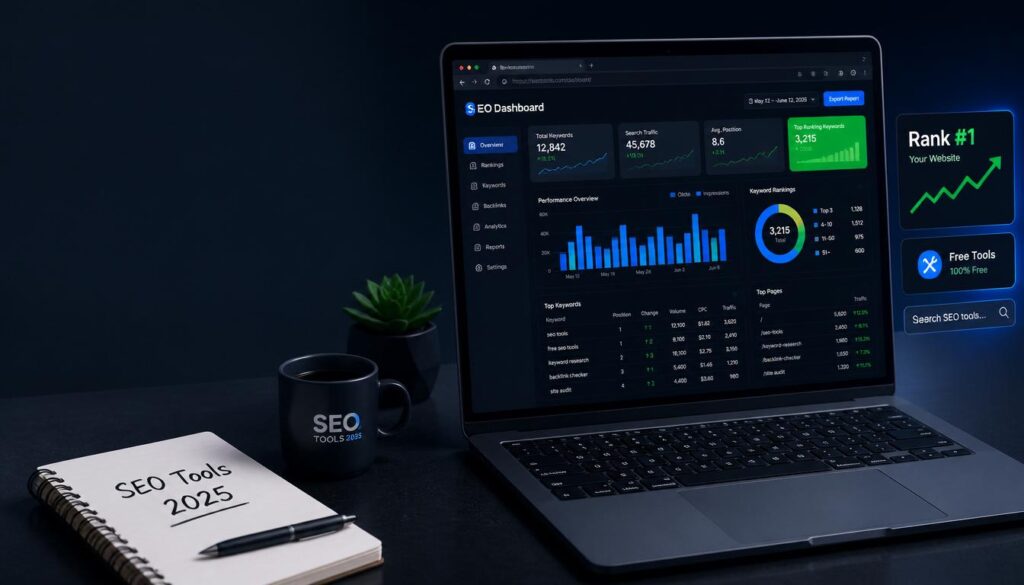
AI SEO Tools

Discover AI-driven SEO tools for keyword research, content optimization, and rank tracking to help your website climb search engine results.

What Is SEO Content Writing
Ai Tools, AI SEO Tools, AI Writing Tools

How to Write SEO Content People Actually Want to Read (2026 Guide)

SEO content writing is the process of creating articles that satisfy both search engines and real readers. It combines keyword research, search intent matching, clear structure, and E-E-A-T signals so your content ranks on Google, gets cited in AI Overviews, and Actually helps the person who clicked on it. If you’ve ever published a blog post and heard nothing but crickets, this guide fixes that. You’ll learn the exact steps to research, write, and optimize content that ranks no fluff, no jargon. What Is SEO Content Writing, Really? SEO content writing means writing with two readers in mind at once: the human who typed a question into Google, and the algorithm deciding whether your Answer deserves a spot on page one. It’s not about stuffing a keyword into every paragraph. It’s about Answering a specific question better than anyone else has answered it, then structuring that answer so search engines and AI tools can find, understand, and trust it. Good SEO content writing does three things: Miss any one of these, and your content struggles no matter how well-written it is. SEO Content Writing vs. Regular Content Writing People often confuse the two. Here’s the difference in practice. Regular Content Writing SEO Content Writing Starting point An idea or opinion Keyword and search intent research Structure Flexible, narrative-driven Clear H2/H3 hierarchy built for scanning Goal Express an idea Rank, get cited, and convert Length Whatever the story needs Matched to what’s already ranking Success measure Engagement, shares Organic traffic, rankings, AI citations Regular content can still rank if it happens to match what people search for. SEO content writing removes the guesswork by starting with research instead of hoping for the best. Why SEO Content Writing Matters More in 2026 Search has split into two lanes: traditional Google results and AI-generated answers from tools like ChatGPT, Gemini, and Perplexity. Both lanes reward the same underlying habits clear structure, real expertise, and content that actually solves the problem. Three shifts make this more important than ever: AI Overviews now sit above organic results. If your content isn’t structured to be quoted directly, an AI summary can answer the question before anyone reaches your page. Google’s Helpful Content system penalizes thin, keyword-stuffed writing. Content built to please an algorithm instead of a person tends to lose visibility over time. Trust decides everything. Google’s own quality guidelines describe trustworthiness as the most important piece of E-E-A-T — content can be technically accurate and still rank poorly if it doesn’t read as credible. The upside: organic search still delivers some of the highest returns in marketing, because a well-optimized page can keep attracting visitors for years without ongoing ad spend. How to Write SEO Content That Ranks: A 9-Step Process Step 1: Research Keywords Your Audience Actually Types Start with a free tool like Google Keyword Planner, or a paid one like Semrush or Ahrefs. Type in your general topic and look for: Practical takeaway: pick one primary keyword per article. Trying to rank one page for five unrelated terms dilutes your focus and confuses search engines about what the page is actually about. Step 2: Match Search Intent Before You Write a Word Search intent falls into four buckets: Google your target keyword and look at what’s already ranking. If the top 10 results are all how to guides, write a how to guide. If they’re all comparison posts, a listicle won’t rank, no matter how good it is. Practical Takeaway: let the current search results dictate your content format, not your personal preference. Step 3: Build an Outline Before You Draft An outline forces you to plan coverage instead of writing in circles. A solid SEO outline includes: This is also where you decide on your “information gain” — the original insight, example, or data point that makes your article worth reading over the other nine already ranking. Step 4: Write for Readers First, Structure for Machines Second Draft your content using short paragraphs (two to three sentences), plain language, and a logical flow from problem to solution. Aim for a 7th–8th grade reading level Simple doesn’t mean simplistic, it means nobody has to re-read your sentence to understand it. Use your primary keyword naturally in: Everywhere else, favor synonyms and related phrases over repeating the exact keyword. Search engines understand context now; they don’t need the same three words hammered into every line. Step 5: Optimize Your On-Page Elements Three small elements decide whether people click your result at all. Element Best Practice Title tag Keyword near the front, under 60 characters Meta description 150–160 characters, active voice, includes a soft CTA URL slug Short, hyphenated, includes the keyword, no dates Practical takeaway: write five title options and pick the one that would make you click if you saw it in a stranger’s search results. Step 6: Build In E-E-A-T Signals E-E-A-T stands for Experience, Expertise, Authoritativeness, and Trustworthiness Google’s framework for judging whether content deserves to rank, especially on topics that affect people’s money, health, or safety. Add real weight to your content by: Practical takeaway: if you can’t back up a claim with a source or firsthand experience, cut it or soften it. Vague authority reads as no authority. Step 7: Optimize for AI Overviews and Featured Snippets This is the step most guides skip, and it’s increasingly the difference between getting traffic and getting summarized without a click. Practical takeaway: after you draft a section, ask yourself if an AI tool could lift that paragraph word-for-word as a correct, standalone answer. If not, tighten it. Step 8: Add Internal and External Links Internal links help search engines understand how your content connects to the rest of your site, and they keep readers exploring instead of leaving. External links to credible sources back up your claims and signal that you did real research. Aim for two to five relevant internal links per 1,000 words, and only link where it genuinely helps the reader — forced links hurt more
Best keyword research tools compared in 2026
Ai Tools, AI SEO Tools

Best Keyword Research Tools in 2026 (Free & Paid, Compared)

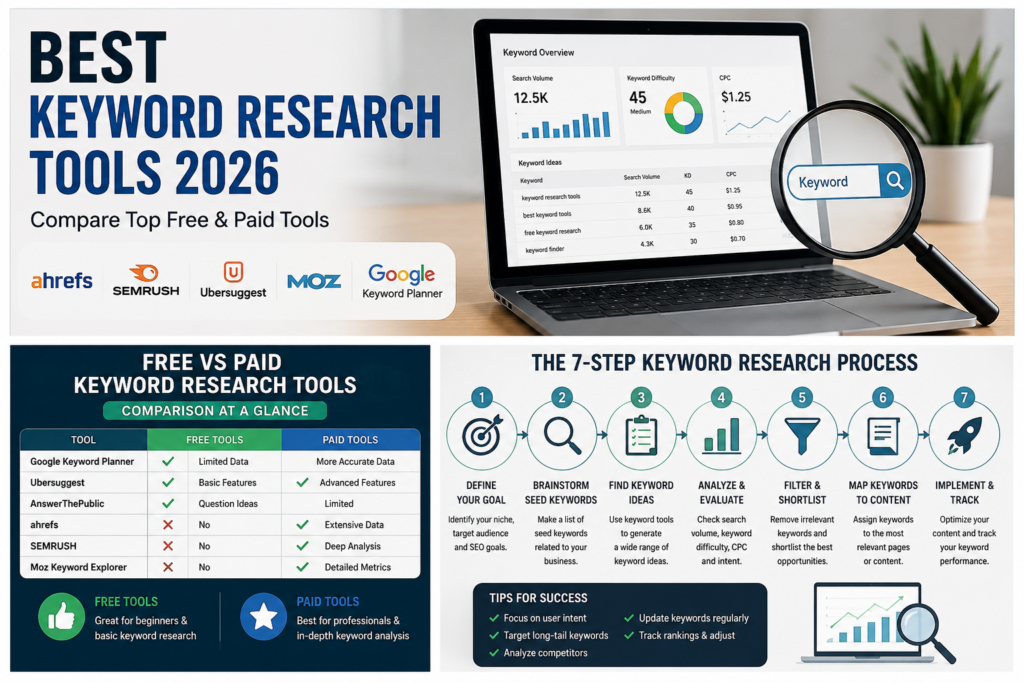
Picking the wrong keyword research tool wastes Months. You end up chasing search volumes that don’t exist, writing about topics your competitors already own, or missing the exact questions your customers are typing into Google and ChatGPT. This guide compares the keyword research tools that are actually worth your time in 2026, including which ones are free, which are worth paying for, and how to pick the right one for your situation. What Is a Keyword Research Tool? A keyword research tool is software that shows you the words and phrases people type into search engines, along with data like Monthly search volume, competition level, and search intent. It helps you decide what to write about and which terms are realistic to rank for. Most keyword research tools pull data from one of three places: Google’s own advertising system (like Google Keyword Planner), clickstream data from real user behavior (like Similarweb), or a mix of both plus their own crawled search results (like Semrush and Ahrefs). None of these sources is perfect. Google’s numbers are ranges, not exact figures, unless you’re actively running ads. Clickstream data is an estimate based on a sample of users. Crawled data can lag behind sudden spikes in interest. That’s why experienced SEOs rarely trust one number from one tool. They use a keyword research tool to generate ideas and rough volume estimates, then confirm real performance later using Google Search Console, which shows what’s actually happening on their own site. What to Look for in a Keyword Research Tool Quick answer: The best keyword research tools combine four things: a large keyword database, Accurate search volume, clear search intent labeling, and a way to see what your competitors already rank for. Anything missing one of these will leave gaps in your strategy. Before you commit to a tool, check it against this list: The Best Keyword Research Tools, Compared Here’s a side-by-side view of the tools worth your attention this year. Tool Best For Free Option Starting Paid Price Standout Feature Google Keyword Planner Free, direct-from-Google data Yes (needs Google Ads account) Free Real Google search data, no third-party estimation Google Search Console Existing sites, real performance data Yes Free Shows keywords you already rank for, with real clicks Semrush All-round SEO, agencies Limited (10 searches/day) ~$139.95/mo Massive database with AI intent classification Ahrefs Competitor keyword gap analysis Limited free tool Paid plans vary Traffic potential metric, huge crawled index Similarweb Real clickstream-based volume Limited free generator Paid plans vary Non-clustered, real-user monthly search volume Moz Keyword Explorer Accurate difficulty scoring 3 searches/day ~$99/mo Difficulty score based on real ranking-page authority Ubersuggest Beginners, small budgets 3 searches/day ~$29/mo Simple interface, content idea suggestions KWFinder (Mangools) Long-tail keywords on a budget Limited Budget-friendly Clean UI built for beginners AlsoAsked People Also Ask & AI Overview research Limited free searches Paid tiers Visual map of real PAA question chains Note on accuracy: No two tools will show you the exact same search volume for the same keyword — that’s normal. What matters more is consistency: pick one or two tools and use them to compare keywords against each other, not to chase an exact number. Free Keyword Research Tools Worth Using Quick answer: If your budget is zero, combine Google Keyword Planner for volume ranges, Google Search Console for real performance data on your own site, and AlsoAsked or Google Autocomplete for question-based long-tail ideas. Together they cover most of what a paid tool does. Expert tip: Run the same seed keyword through two or three free tools before you commit to a content topic. If a keyword shows decent volume in Keyword Planner but zero related questions in AlsoAsked, the topic may be too narrow to build a full article around. Paid Keyword Research Tools Worth Paying For Quick answer: Upgrade to a paid tool once you’re publishing regularly and need competitor keyword gaps, clustering, and rank tracking in one place. Semrush and Ahrefs cover the most ground; Similarweb and Moz are strong on specific strengths (real clickstream volume and difficulty accuracy). Common mistake: Buying the most expensive tool before you have a content calendar to use it on. A $139/month tool sitting mostly idle is a worse investment than a $29/month tool you actually open every week. How to Do Keyword Research, Step by Step Quick answer: Start with a broad seed keyword, expand it into a full list using a keyword tool, filter by search intent and realistic difficulty, then check what’s already ranking before you commit to writing. Keyword Research for AI Search Quick answer: Keyword research now has to account for how people search inside AI tools like Google AI Overviews, ChatGPT, and Perplexity — not just the traditional blue-link results. These platforms favor content that answers a question directly and clearly, often within the first few sentences of a section. This is the part most keyword guides still skip. A few practical adjustments: Common Keyword Research Mistakes to Avoid How to Choose the Right Tool for You If you are… Start with A brand-new blogger with no budget Google Keyword Planner + Google Autocomplete + AlsoAsked A small business with some budget Ubersuggest or KWFinder A growing content team Semrush or Ahrefs An agency managing multiple clients Semrush or Ahrefs (workflow and reporting depth) Focused on real, unmodeled search volume Similarweb Focused on keyword difficulty accuracy Moz Keyword Explorer FAQs What is the best keyword research tool overall? There’s no single “best” tool for everyone — Semrush and Ahrefs lead for all-round depth, Similarweb leads for real clickstream-based volume, and Google Keyword Planner remains the best free, direct-from-Google option. Are free keyword research tools accurate enough to use? Free tools like Google Keyword Planner and Search Console are accurate for their intended purpose, but Keyword Planner shows volume ranges rather than exact figures unless you’re running active ad spend. Do I need a paid keyword research tool to rank on Google? No. Many sites rank well using only free

Why Is My Website Not Ranking on Google
Ai Tools, AI SEO Tools

Why Is My Website Not Ranking on Google? 17 Proven Fixes (2026)

So you built a website, published content you were genuinely proud of, and waited for the traffic to roll in. Instead… crickets. If that’s you, take a breath. This happens to almost Everyone, even people who did most things right. Here’s the short answer first: your Website Not Ranking on Google because of one (or more) of these issues poor indexing, weak content, Technical SEO problems, low-quality backlinks, slow page speed, a rough user experience, or simply targeting the wrong keywords. The fix starts with checking Google Search Console, cleaning up Technical errors, sharpening your content, and steadily building authority around your topic. Let’s walk through exactly what’s likely going wrong, and how to fix it. First, How Does Google Actually Decide Who Ranks? Before you troubleshoot Anything, it helps to know the basic path a page takes to reach Google’s search results. Google crawls your site to find your pages. Then it indexes the pages it thinks are worth storing. After that, it ranks your page Against everyone else competing for the same search. And even after all that, it keeps adjusting your ranking over time based on how people behave when they land on your page. If your site stumbles at any one of these steps, nothing downstream matters. A page that isn’t crawled can’t be indexed. A page that isn’t indexed can’t rank. So before you touch your keywords or your content, make sure Google can actually find and store your pages in the first place. 1. Your Pages Might Not Be Indexed Yet This is the single most common reason a site doesn’t rank — Google simply hasn’t added the page to its index yet. And an unindexed page has zero chance of showing up in search results, no matter how good it is. Want to check? Search site:yourdomain.com on Google. If your key pages don’t show up, that’s a red flag. You can also open Google Search Console and look at the Pages report, which tells you exactly which pages are indexed, excluded, or stuck with crawl errors. What usually causes this? A stray noindex tag you forgot about. A robots.txt file Accidentally blocking the page. A soft 404. Duplicate URLs. A canonical tag pointing somewhere else. Content that’s too thin to be worth indexing. Or the page might just be brand new and Google hasn’t gotten to it yet. The fix is refreshingly simple: remove any accidental noindex tags, double-check your robots.txt file, submit your XML sitemap, and request indexing directly through Search Console. If the page is thin, beef it up before asking Google to look again. Indexing is the floor everything else sits on get this right first. 2. You Might Be Chasing the Wrong Keywords It’s tempting to go after keywords with huge search volume. But those keywords are usually locked up by websites that have been building authority for years. A brand-new site trying to rank for something broad like “SEO” is fighting an uphill battle it probably won’t win Anytime soon. You might be Aiming at the wrong keywords if the competition looks intimidating, the search intent feels vague, big brands own the entire first page, or your click-through rate is low even though people are seeing your listing. A smarter approach: go after long-tail keywords, lower-competition phrases, and question-based searches —the specific stuff people actually type when they’re trying to solve a real problem. Instead of one article trying to cover everything, build a small cluster of related posts around one topic. For example, Alongside an article on “website not ranking on Google,” you could add pieces on how Google indexes sites, a Search Console beginner’s guide, a Technical SEO checklist, and an explainer on robots.txt. Together, they tell Google you actually know this subject not just one corner of it. 3. Your Content Might Not Match What People Actually Want Google’s whole job is matching searchers with the best possible answer. If your page doesn’t actually solve the problem someone typed in, it’s not going to rank well, even if it’s technically flawless. Most searches fall into one of four buckets: people looking to learn something, people trying to find a specific site, people comparing options before buying, or people ready to take action right now. Someone searching “website not ranking on Google” wants troubleshooting help not a sales pitch. Common traps include vague intros that dance around the actual problem, theory without practical steps, ignoring beginner-level questions, and skipping screenshots or examples that would make things clearer. To fix this, Answer the core question early within the first hundred words if you can break the topic into clear steps, use real examples, and keep updating the piece as things change. A useful gut check before hitting publish: does this fully solve the reader’s problem? If not, it’s not done yet. 4. Technical SEO Issues Might Be Quietly Sabotaging You You can write brilliant content and still get buried if your site has technical problems under the hood. Think of technical SEO as your site’s foundation if it’s shaky, nothing built on top of it stands very tall. Watch out for broken internal links, 404 pages, redirect loops, a missing sitemap, wrong canonical tags, duplicate URLs, weak mobile usability, and HTTPS issues. A few free tools make this easy to check: Google Search Console for crawl and indexing errors, PageSpeed Insights for performance, the Rich Results Test for structured data, and Lighthouse for an overall health check. Fixing this is mostly cleanup work: repair broken links and redirects, keep your sitemap current, use canonical tags correctly, make sure important pages return a clean 200 status, and confirm your site works well on mobile. A technically healthy site is just easier for Google to crawl and that alone gives your pages a real edge. 5. Your Site Might Be Loading Too Slowly Speed matters twice over once for rankings, and once because slow pages just lose people. If your site takes too long to load, visitors leave

AI Search Engine Ranking Tracking Tool
Ai Tools, AI SEO Tools

Best AI Search Engine Ranking Tracking Tool 2026

Your blog can sit at position #1 on Google and still be completely invisible the moment someone asks ChatGPT or Google’s AI Overview the same question. That’s the uncomfortable reality a lot of in-house marketing teams are running into right now, and it’s why the search for the right AI search engine ranking tracking tool has picked up so much momentum. An AI search engine ranking tracking tool monitors whether your brand or content appears, is cited, or is mentioned inside AI-generated answers from ChatGPT, Google AI Overviews, Gemini, and Perplexity. Unlike traditional rank trackers, which measure fixed positions in blue-link results, these tools track citations, brand mentions, and share of voice because AI answers vary by prompt, device, and location. This guide breaks down what these tools actually do, how they work under the hood, what to look for before you buy one, and which platforms are worth shortlisting in 2026. What Is an AI Search Engine Ranking Tracking Tool? At its core, an AI search engine ranking tracking tool is software that checks whether your website, product, or brand name shows up inside the answers generated by AI search systems. Instead of telling you “you rank #3 for this keyword,” it tells you “your brand was mentioned in 6 out of 20 AI Overview responses this week, and these are the URLs Google cited alongside you.” This matters because AI visibility (sometimes called AI search visibility or generative engine optimization, GEO) doesn’t follow the same rules as classic SEO. A handful of terms get thrown around in this space, and it’s worth knowing what they mean before you start comparing tools: A good AI search engine ranking tracking tool pulls all of these threads together into one dashboard, so your team isn’t manually copying and pasting prompts into five different chatbots every Monday morning. How Does AI Rank Tracking Different From Traditional SEO Rank Tracking? Traditional rank tracking is built around a simple idea: type in a keyword, and the tool tells you where your page lands in a numbered list of results. That number is fairly stable, it’s tied to a specific URL, and it’s measured the same way every time you check it. AI rank tracking throws most of that out the window. There’s no fixed list of ten blue links there’s a synthesized answer that’s stitched together from multiple sources, and that answer can be different for two people who type the exact same question, depending on their location, device, or even the exact wording they used. So “ranking” in AI search isn’t really a position anymore; it’s a question of whether you show up at all, and how prominently. Factors Traditional SEO Rank AI Search overview Ranking Ranking System Numbered positions (1, 2, 3…) Presence/absence in a generated answer Tracking Method Keyword-based position tracking Prompt-based and entity-based tracking Authority Signal Backlinks and domain authority Citations, brand mentions, and topical depth Consistency Largely stable per keyword Can vary by device, location, and phrasing What “winning” looks like Top 3 organic positions Being cited as a source inside the AI answer None of this means traditional SEO stops mattering strong rankings still feed the content that AI engines pull from. It just means you now need a second lens on top of your existing rank tracker, and that’s exactly the gap an AI search engine ranking tracking tool is built to fill. How Do AI Search Engine Ranking Tracking Tools Actually Work? Most platforms in this category follow a similar pipeline, even if the dashboards look different. It starts with you defining a set of prompts or keywords you care about things your actual customers might ask an AI assistant, not just the keywords you’d type into Google. From there, the tool runs those prompts against AI search systems on a schedule (daily, weekly, or on demand), captures the response, and checks whether it triggered an AI Overview or AI Mode result at all. Some queries simply don’t generate one, and a decent tool will tell you that instead of pretending every prompt has a measurable “rank.” Once a response comes back, the tool extracts which URLs and domains were cited, normalizes those URLs so duplicates and tracking parameters don’t skew the data, and stores a timestamped snapshot. Finally, the platform rolls all of that into metrics: presence rate, citation share versus competitors, and trends over time. The better tools go one step further and turn that data into specific recommendations, like “competitors are winning citations with comparison guides — here’s a content brief.” What Should You Look for in an AI Rank Tracking Tool? (Checklist) It’s easy to get distracted by flashy dashboards, so it helps to judge platforms against a short, objective checklist rather than whichever tool has the slickest demo. Here’s what actually moves the needle: Run any shortlist through these six criteria and you’ll usually narrow ten options down to two or three pretty quickly. From there, a free trial or audit is the fastest way to confirm the data quality matches what’s advertised. Best AI Search Engine Ranking Tracking Tools Compared (2026) The market for AI search engine ranking tracking tools has grown quickly, and pricing or features can shift between releases, so treat the figures below as a starting point and confirm current plans directly with each vendor before buying. Tool Best For AI Engines Covered Citation-Level Data Starting Price Profound Enterprise teams needing deep multi-LLM coverage ChatGPT, Perplexity, Gemini, AI Overviews + more Yes Mid-to-high tier Peec AI Agencies managing multiple client brands AI Overviews, ChatGPT, Perplexity, Gemini Yes Mid tier Otterly AI Solo marketers and small businesses on a budget AI Overviews, ChatGPT, Perplexity + others Yes (higher tiers) Budget-friendly entry plan SE Ranking SEO teams wanting AI tracking inside an existing toolkit AI Overviews + traditional SERP tracking Yes Mid tier Semrush Existing Semrush users adding AI visibility AI Overviews + AI Mode Yes Mid tier, often as an add-on Ahrefs Enterprise SEO teams already on

search engine optimization free tools
Ai Tools, AI SEO Tools

35 Best Search Engine Optimization Free Tools for Fast Rankings

Most SEO tools cost Anywhere from $99 to $500 a Month. That’s a steep entry ticket for a Blogger, a small Business owner, or a freelancer just trying to get their site to show up on Google. Here’s the thing nobody tells you you don’t need to spend a dollar to rank higher. The right search engine optimization free tools can handle keyword research, technical audits, backlink analysis, and on-page optimization everything a paid suite does, at zero cost. This guide breaks down 35 of the best free SEO tools, organized by exactly what you need to do with them, so you can stop guessing and start ranking. Quick-Pick: Best Free SEO Tools at a Glance Before diving deep, here’s a fast-reference table so you can jump straight to what you need. Free SEO Tools Comparison Table Tool Category Best For Free Limit Paid Option Google Search Console Technical / Analytics Indexing, clicks, Core Web Vitals Unlimited (your site only) Free always Google Keyword Planner Keyword Research Search volume, bid data Unlimited with Google Ads account Free always Ahrefs Webmaster Tools Backlinks / Technical Backlink profile, site audit Your verified sites only Ahrefs from $129/mo Screaming Frog Technical Audit Site crawl, broken links 500 URLs free £199/yr Google PageSpeed Insights Technical Core Web Vitals, speed Unlimited Free always Moz Link Explorer Backlinks DA, backlink count 10 queries/month Moz Pro $99/mo SimilarWeb Analytics / Competitor Traffic estimates Limited monthly data Paid plans AnswerThePublic Keyword Research Question-based queries 3 searches/day free $9/mo Yoast SEO On-Page WordPress on-page checks Core features free Premium $99/yr Google Trends Keyword Research Seasonal trends, momentum Unlimited Free always Think of this table as your map. The rest of this guide is the territory. Free Keyword Research Tools Keyword research is where every SEO campaign begins. Before you write a single sentence, you need to know what people are actually searching for and whether you have a realistic shot at ranking for it. These free keyword research tools give you that data without a subscription. Google Keyword Planner – Best Free Keyword Volume Tool Google Keyword Planner is the original free keyword research tool, built directly into Google Ads. Enter any keyword and it returns monthly search volume ranges, competition levels, and dozens of related keyword suggestions you may never have thought of. The catch: you need a Google Ads account (free to create, no spending required), and volume data appears in ranges like “1K–10K” rather than exact numbers. For most planning purposes, that’s enough to decide whether a keyword is worth pursuing. Think of it as Google telling you the size of the room before you walk in. How to use it: Go to Google Ads → Tools → Keyword Planner → Discover New Keywords. Enter your topic (“SEO tools for small business”) and export the suggestions into a spreadsheet to sort by competition. Google Trends – Spot Keyword Momentum for Free Google Trends doesn’t show search volume it shows relative interest over time. That distinction matters. A keyword with rising trend data is worth targeting even if its current volume looks modest, because you’re catching it on the way up. Use it to compare two keyword variations (“free SEO tools” vs. “SEO tools free“), identify seasonal spikes, and spot geographic concentrations of interest. If you’re writing content in June, Trends will tell you whether your topic peaks in Q4 so you can plan accordingly. Ahrefs Free Keyword Generator Ahrefs offers a no-login keyword tool at ahrefs.com/keyword-generator. Enter any seed keyword and get up to 150 keyword ideas with Keyword Difficulty (KD) scores one of the most useful free data points available without a paid account. The KD score alone makes this worth bookmarking. A KD of 10–20 on a keyword with decent volume? That’s a green light for a new site to target it. AnswerThePublic – Free Question & Long-Tail Research AnswerThe Public visualizes every question people ask around a topic who, what, when, where, why, and how. It pulls autocomplete data from Google and Bing and maps it into a web of long-tail keyword opportunities. The free tier gives you three searches per day, which is plenty for building out a FAQ section or finding H3-level subtopics you hadn’t considered. A search for “SEO tools” will surface gems like “what SEO tools do professionals use” questions your competitors probably haven’t answered yet. Free Technical SEO Audit Tools Technical SEO is what happens under the hood. Broken links, slow page speed, crawl errors, duplicate content these issues silently tank your rankings without any visible warning. These free technical SEO audit tools surface those problems so you can fix them. Google Search Console – #1 Free SEO Tool Overall If you only use one free SEO tool for the rest of your life, make it Google Search Console. It’s free, it comes directly from Google, and the data is about your site specifically not estimates or third-party approximations. GSC shows you which queries bring users to your site, which pages Google has indexed (and which it hasn’t), Core Web Vitals scores, mobile usability issues, and manual penalties. The Coverage report alone can reveal why pages you think are ranking simply aren’t being crawled. Set it up the day you launch any website not six months later. Quick win: Open the Performance report, filter by Position 5–15, and sort by Impressions. Those are pages that are one optimization push away from page one. Screaming Frog SEO Spider (Free Version) Screaming Frog is a desktop crawler that mimics how Google’s bot reads your site. The free version crawls up to 500 URLs and surfaces broken links (404s), redirect chains, missing meta descriptions, duplicate title tags, and pages blocked by robots.txt. For a site under 500 pages, the free tier is all you’ll ever need. Run a crawl, export the results to a spreadsheet, and sort by issue type. It’s like getting an X-ray of your site’s technical health in under ten minutes. Google PageSpeed Insights – Free Core

ai platform monitoring tool for content gap analysis
Ai Tools, AI SEO Tools

10 AI Monitoring Tools Every SEO Expert Should Try

Most content teams are still fighting yesterday’s battle. They run a keyword gap report, find a dozen missing terms, write a blog post, and call it strategy. Meanwhile, ChatGPT and Google AI Overviews are Quietly answering your audience’s questions using your competitor’s content instead of yours. That’s the real problem an ai platform monitoring tool for content gap analysis is built to solve. It’s not just about finding keywords you don’t rank for it’s about understanding why AI models keep citing someone else when they could be citing you. This guide breaks down what these tools do, the types of gaps they uncover, the features that actually matter, and a step-by-step workflow you can start using this week. What Is an AI Platform Monitoring Tool for Content Gap Analysis? An ai platform Monitoring tool for content gap analysis is software that continuously compares your website’s content against competitors, search intent data, and AI-generated answers to find what you’re missing. Instead of a one-time audit, it runs in the background, flagging new gaps as they appear. Think of it as a radar system for your content strategy always scanning, always alerting you before a competitor pulls ahead. The “monitoring” part matters more than people realize. A static report goes stale the moment a competitor publishes something new. A monitoring platform catches that shift in near real time, so you’re reacting in days instead of months. Definition and Core Concept At its Core, Content gap analysis is the process of identifying topics, formats, or angles your competitors cover that you don’t. An AI-powered version takes this further by using natural language processing to understand intent, not just keywords. It looks at entities, semantic relationships, and the structure of top performing content. For example, if you run a SaaS blog and your competitor has fifty articles covering “API rate limiting” from every angle tutorials, comparisons, troubleshooting while you have two, the AI doesn’t just flag a missing keyword. It flags a structural gap in your topical authority around that entire cluster. How It Differs from Traditional Content Gap Analysis Traditional gap analysis is Quantitative: export your keyword list, export a competitor’s, subtract one from the other. It’s useful, but it’s also blunt. It tells you what words are missing without telling you why your content isn’t being chosen. AI content gap analysis adds a qualitative layer. It evaluates information gain, entity completeness, and content depth the same signals AI Overviews and chatbots use when deciding which source to cite. That shift from “missing words” to “missing information” is the entire reason this category of tool exists. Why Content Gap Analysis Matters for AI Search Visibility If your content strategy still treats Google as the only audience, you’re leaving traffic on the table. AI Overviews, Perplexity, and ChatGPT now answer a huge share of informational queries directly, often without a single click to your site. Whether your brand gets mentioned in that answer depends entirely on how complete and citable your content is. This is where AI visibility tracking earns its place in your toolkit. A content gap analysis that ignores AI citations is only solving half the problem and it’s increasingly the smaller half. The Shift from Keywords to AI Citations A few years ago, ranking in the top three organic results was the goal. Now, even a top-three result can get buried under an AI Overview that answers the question before the user scrolls. The new question isn’t “do I rank?” — it’s “does the AI model trust my content enough to quote it?” This shift from rankings to AI citation gap analysis changes how you prioritize content. A page ranking #5 that gets cited in AI Overviews can drive more visibility than a page ranking #1 that doesn’t. Monitoring tools that track LLM citation patterns help you see this distinction clearly. Information Gain and Why AI Models Cite Certain Content AI models are trained to surface answers that add something new a concept often called information gain. If ten articles already say the same thing about a topic, the model has no reason to prefer yours unless it offers a sharper explanation, original data, or a more complete entity coverage. Practically, this means a 600-word post that rehashes common knowledge won’t get cited, even if it’s well-optimized for keywords. A 1,500-word post with a unique framework, original examples, and clear structure stands a far better chance this is the kind of gap an ai platform monitoring tool for content gap analysis is designed to expose. Types of Content Gaps an AI Monitoring Tool Can Identify Not all content gaps look the same, and lumping them together leads to weak content briefs. A good monitoring platform separates gaps into distinct categories so your team knows exactly what kind of fix is needed a new article, an update, a format change, or a deeper rewrite. Here’s a breakdown of the gap types that show up most often in AI-driven audits: Topic Gaps and Semantic Clustering Topic gaps are the most obvious type — you simply haven’t written about something your competitors have. But semantic clustering takes this further by grouping related entities together. If “content gap analysis” sits in a cluster with “topical authority,” “entity coverage,” and “competitor benchmarking,” and your site only addresses one of those, the AI flags the whole cluster as underdeveloped. This matters because search engines and AI models increasingly evaluate sites at the cluster level, not the individual page level. A single great article surrounded by a thin topic cluster won’t carry the same weight as one article supported by ten related pieces. Intent Gaps (Informational, Navigational, Commercial, Transactional) Intent gaps happen when you’ve covered a topic but missed the specific way people want to engage with it. A site might have plenty of transactional content pricing pages, product pages but almost nothing informational, like guides or explainers that answer top-of-funnel questions. An AI monitoring tool can scan your entire site and categorize every page by intent

Scroll to Top